Test the whole trading day before choosing EPOS
Use these practical checks with your own menu, products and equipment. The screenshots and recorded tests below come from earlier Codeer-branded builds; worked examples are identified in their sections. They do not establish current plan entitlements or guarantee compatibility with your setup.
Codeer pub EPOS · Real software screens and a practice round
From an open pub tab to a checked cash-up
Choosing a pub till? Start with the jobs your bar staff repeat: hold a round, recall the right tab, settle it and leave the next shift a clear record. These Codeer screen captures show where to look. The £15 exercise below gives you figures to check in your own trial.
What these images prove: they show the actual Codeer Tables, Actions and Back Office screens from an earlier demonstration build, not generated equipment mock-ups. They are separate captures, not a recorded £15 transaction. Some demo screens use dollars; the pound figures below are a separate UK example. Layouts can differ in the current pilot.
1. Keep the round attached to the right table or tab
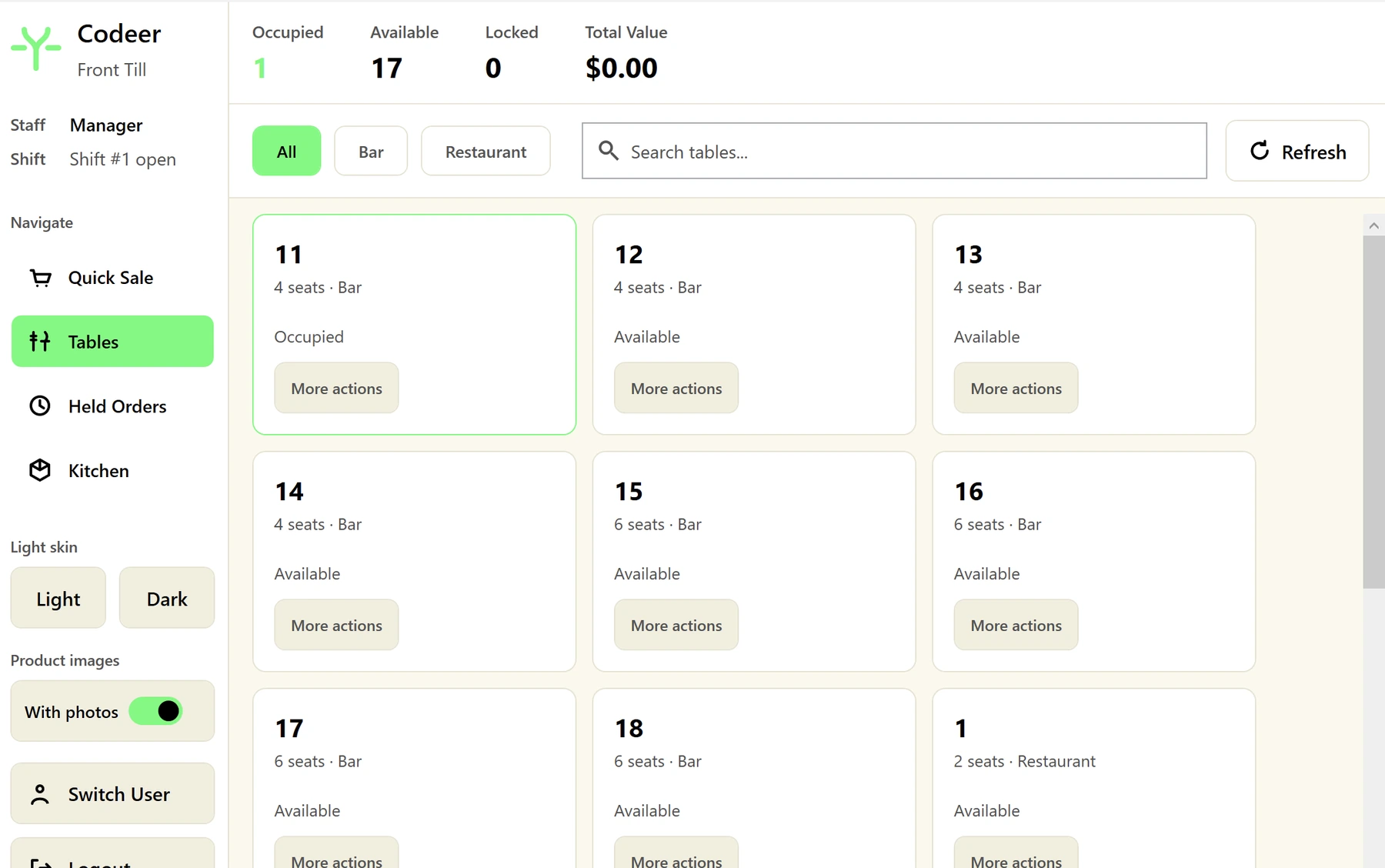
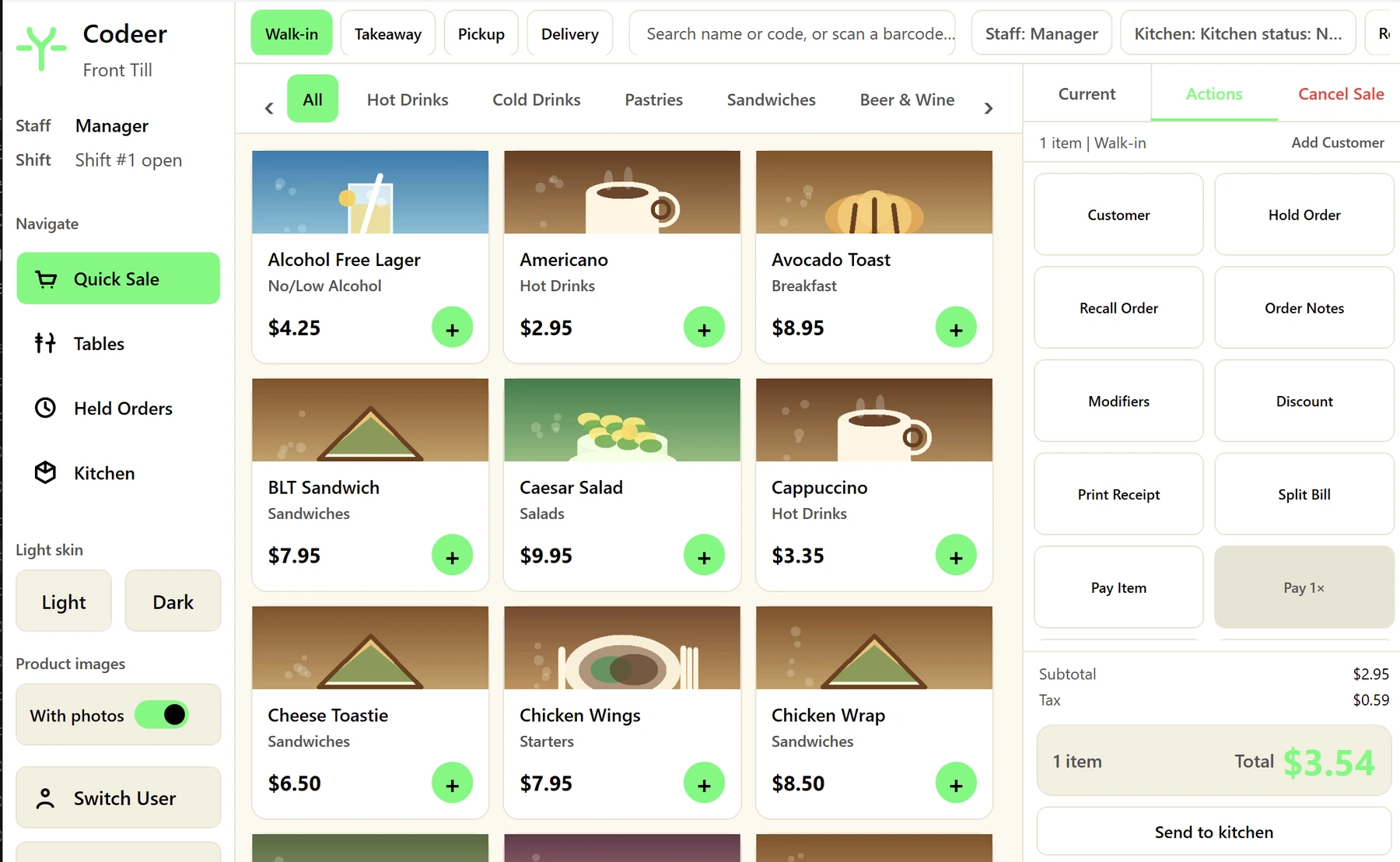
In a trial, open a clearly named table or held order, add a round, leave the screen and recall it. Ask a second staff member to identify the right order. Check that the drinks and balance survive the handover before testing another round.
2. Test split payments with a £15 practice tab
- In a non-trading test, add one pint at £5.60 and two halves at £2.90 each: £11.40. Add a guest-beer half at £3.60: £15.00.
- Ask for a demonstration of £5 cash and £10 card against that tab. Check whether Split Bill divides items, people or payment methods in your version; these are different operations.
- The expected result is no unpaid balance and no duplicate open tab. A card entry on the till is not proof the card terminal took payment: reconcile with the terminal separately.
This is an acceptance exercise, not a claim that these payments were taken in the pictured session. Use the full pub comparison checklist and printable scorecard.
3. Check the close, not just the sales dashboard
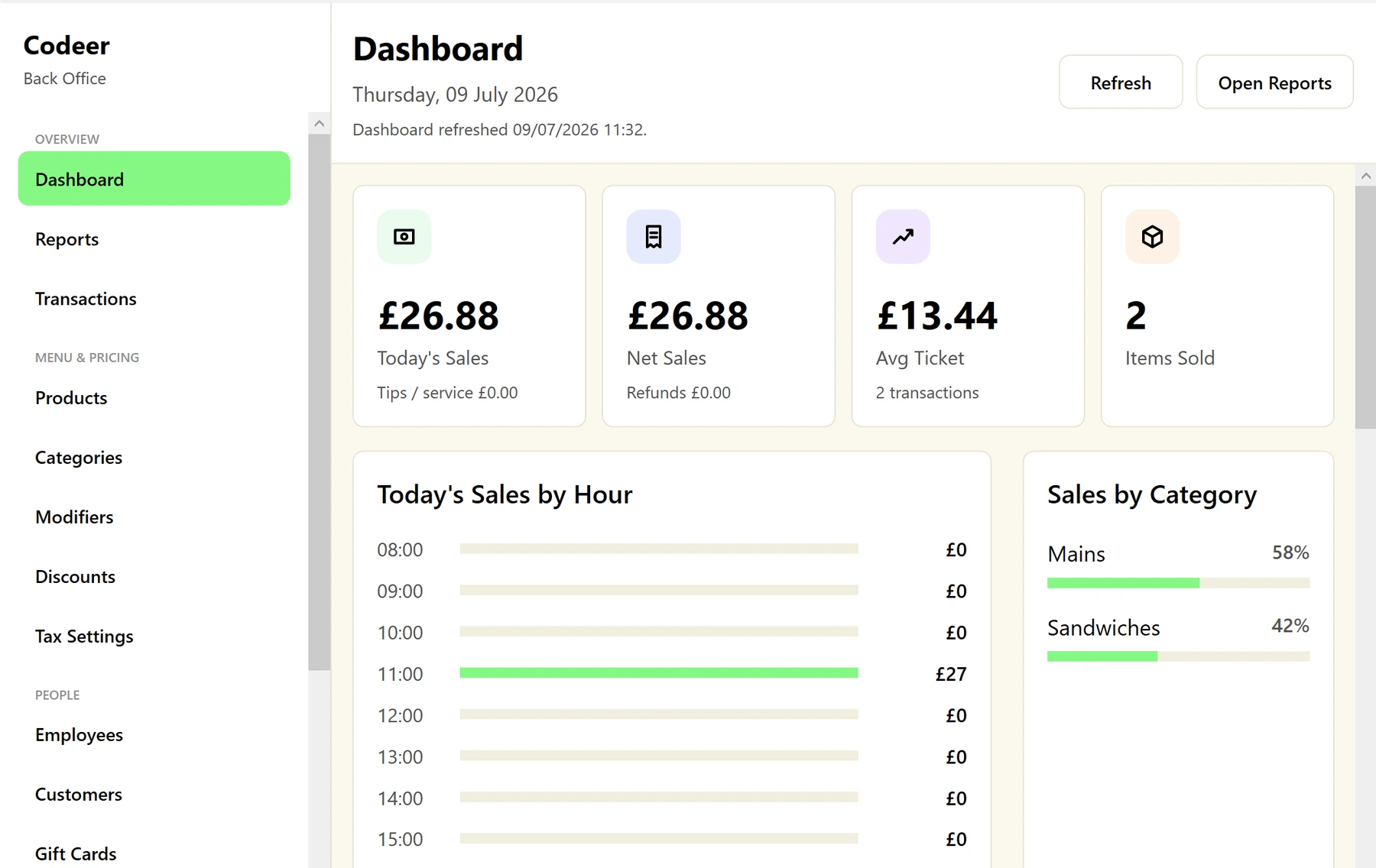
For the practice tab, look for £15 in payments split £5 cash and £10 card. With a £100 opening float and no other cash movements, the expected drawer is £105, not £115. Record actual cash separately and investigate any difference. Open Reports and compare the transaction list, cash-up and terminal totals; a sales dashboard alone does not prove the drawer balances.
Ordeer POS, formerly Codeer POS, is a brand of Codeer Labs Ltd. Standalone retail and hospitality EPOS is free. PRO is available for £10/month + VAT and includes cloud, ecommerce and support. Hardware, payment processing and bespoke services are separate. See Ordeer for current requirements and pricing. View Ordeer pricing.
Still comparing? Read how to choose EPOS for a small pub or how to reconcile the day.
Codeer restaurant EPOS · Order, kitchen and close
Follow an order from the till to the kitchen
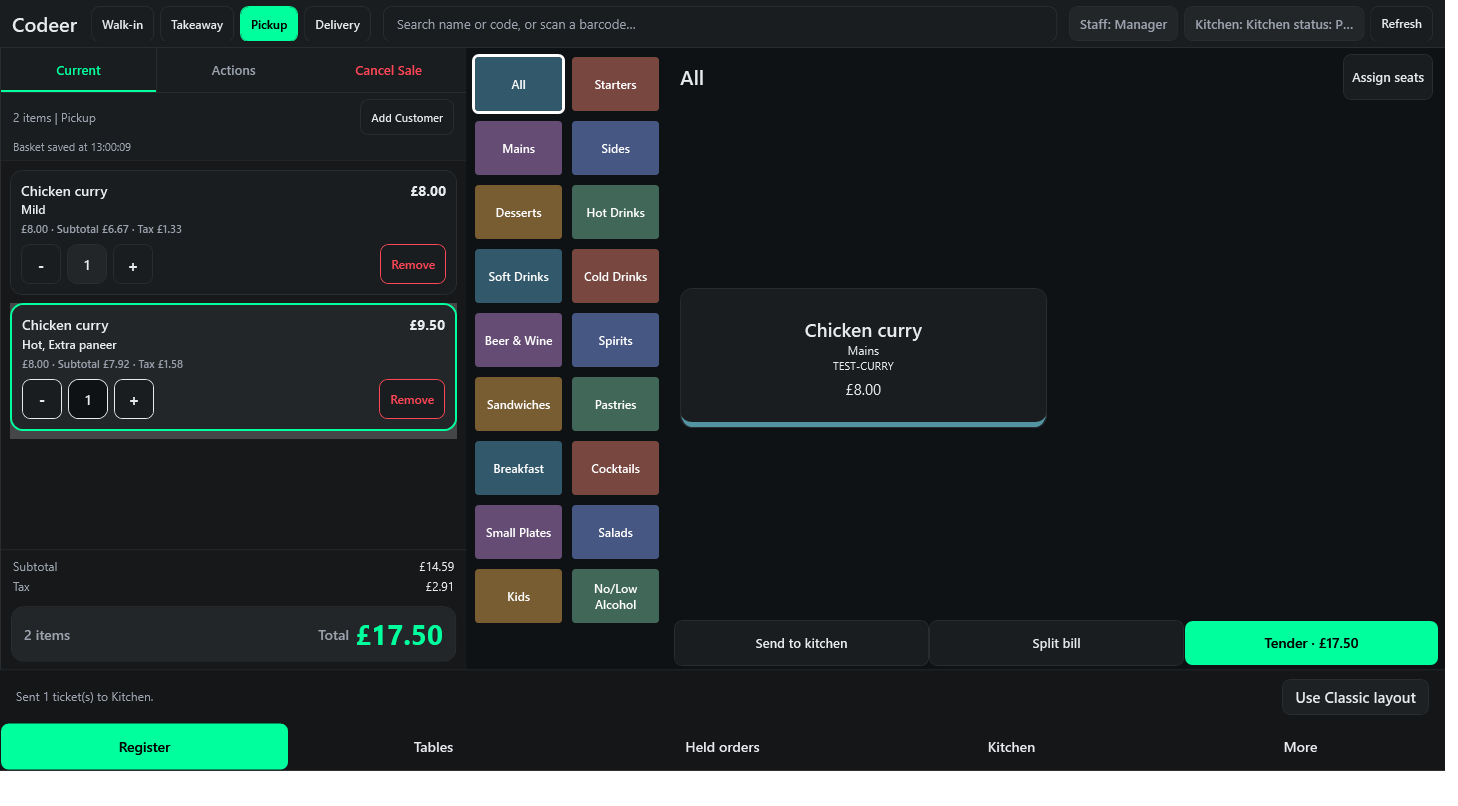
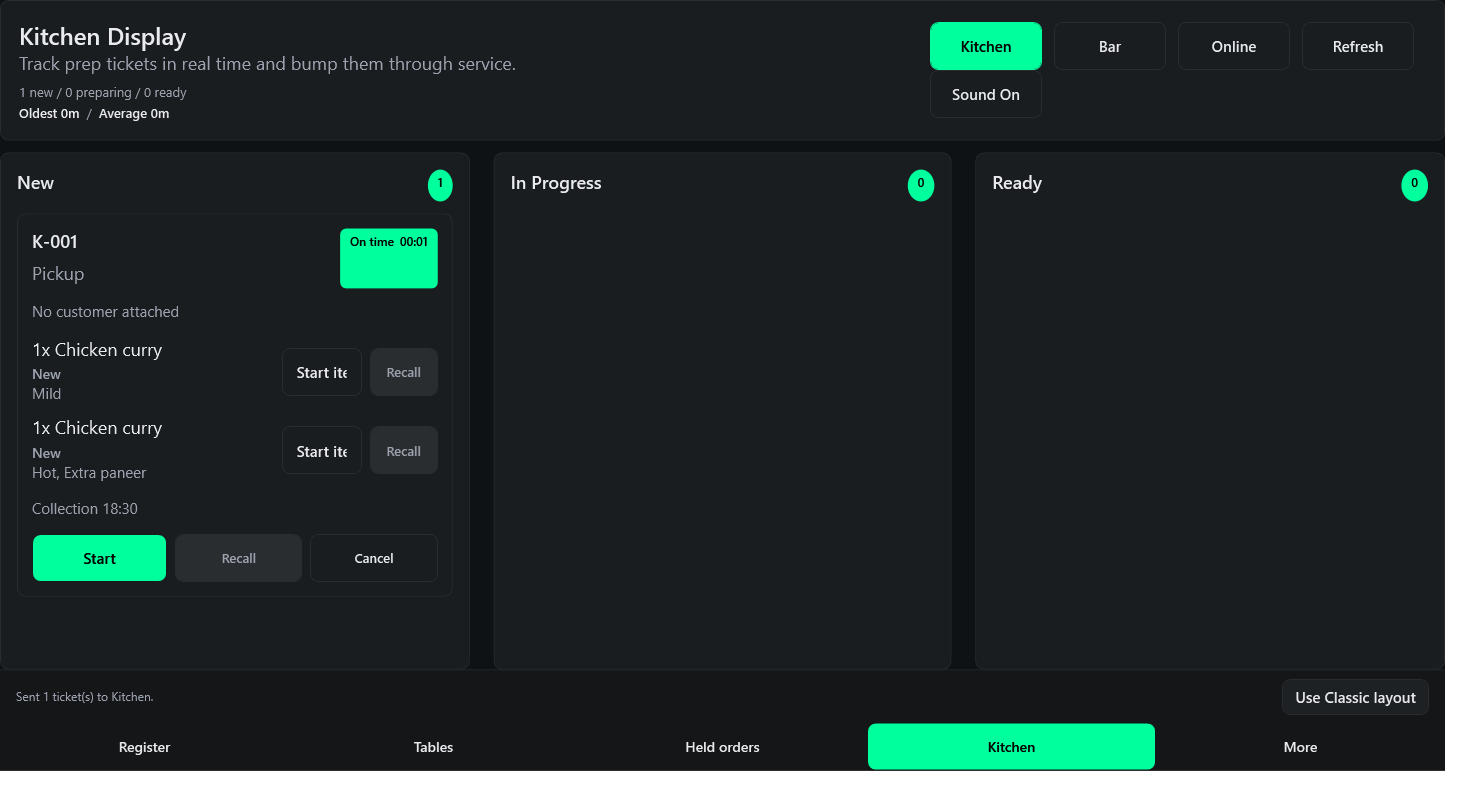
Two customers order the same main with different instructions. Can the cook tell them apart, see a change and avoid making a duplicate meal? Our recorded Free 2026.1.11 pilot test answered that kitchen question. Use the payment and close-out checks below to finish evaluating your restaurant setup.
Test scope: the screenshots and saved test log are from 9 November 2026. This was an automated Pickup order on a Windows 11 virtual machine with a separate sample menu, not a dine-in table-service test. No card payment, paper printing or end-of-day close was performed in that run. Those steps below are checks for your own trial.
1. Enter two dishes with different instructions
The till held two £8 chicken curries: one mild, one hot with a £1.50 paneer extra. The total was £17.50. The order was set to Pickup with “Collection 18:30”. For dine-in service, separately test opening the correct table, adding a later course and recalling that order.
2. Correct the kitchen ticket before payment
Removing the £1.50 extra reduced the till total to £16. On the same K-001 ticket the cook saw “Changed from Hot, Extra paneer to Hot”. The mild curry and collection time stayed unchanged. Sending again left one ticket with two portions.
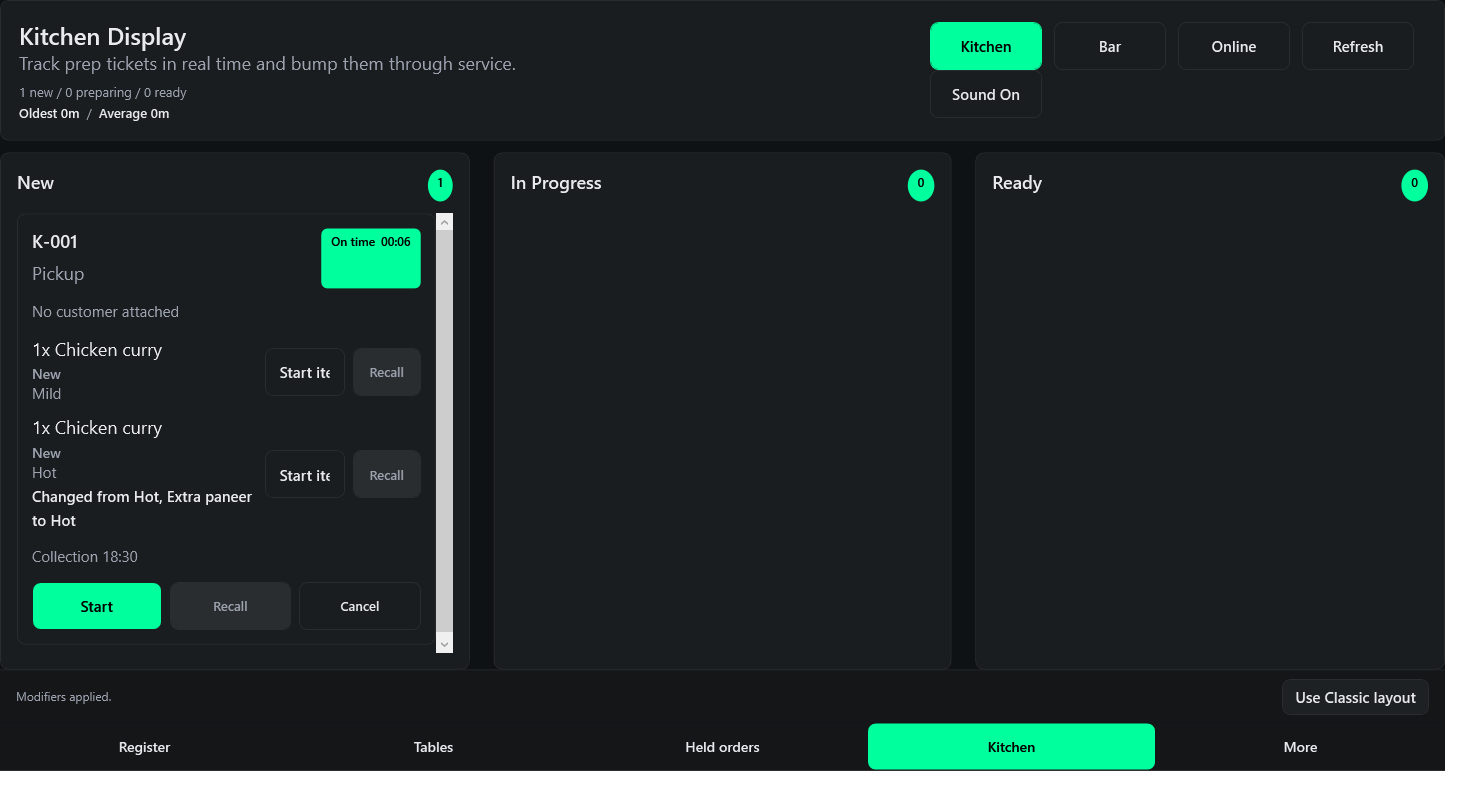
A digital kitchen ticket is not a paper-printer test. Check your actual printer, kitchen screen and network before using this workflow in service. See the full test setup, hardware and limitations.
3. Settle the bill and check the end-of-day figures
Next check to run, not a result from the recording: settle the corrected £16 order using the payment method you intend to offer. Expect no outstanding balance and £16 recorded once, not £17.50 or £33.50. If you offer split payments, test £6 cash plus £10 card and confirm both entries. Check any card transaction against the processor’s own record.
With a £100 opening float, that £6 cash payment and no other cash movements, expected drawer cash is £106. Review the transaction list and daily close, count the drawer, then check corrections and refunds separately. Follow the end-of-day reconciliation guide.
What can I try for free?
Ordeer POS, formerly Codeer POS, is a brand of Codeer Labs Ltd. Standalone retail and hospitality EPOS is free. PRO is available for £10/month + VAT and includes cloud, ecommerce and support. Hardware, payment processing and bespoke services are separate. See Ordeer for current requirements and pricing. View Ordeer pricing.
Check what free EPOS includes before choosing equipment or optional services.
Independent cafés and coffee shops · A practical till trial
Can your café till keep two different coffees clear?
For a coffee shop, the useful test is not how many buttons the till has: it is whether a new member of staff can enter two similar drinks, change one and pass the right instructions to the barista. Try the sample order below with your own menu before using the till in service.
1. Build a £10.30 order without losing the milk choices
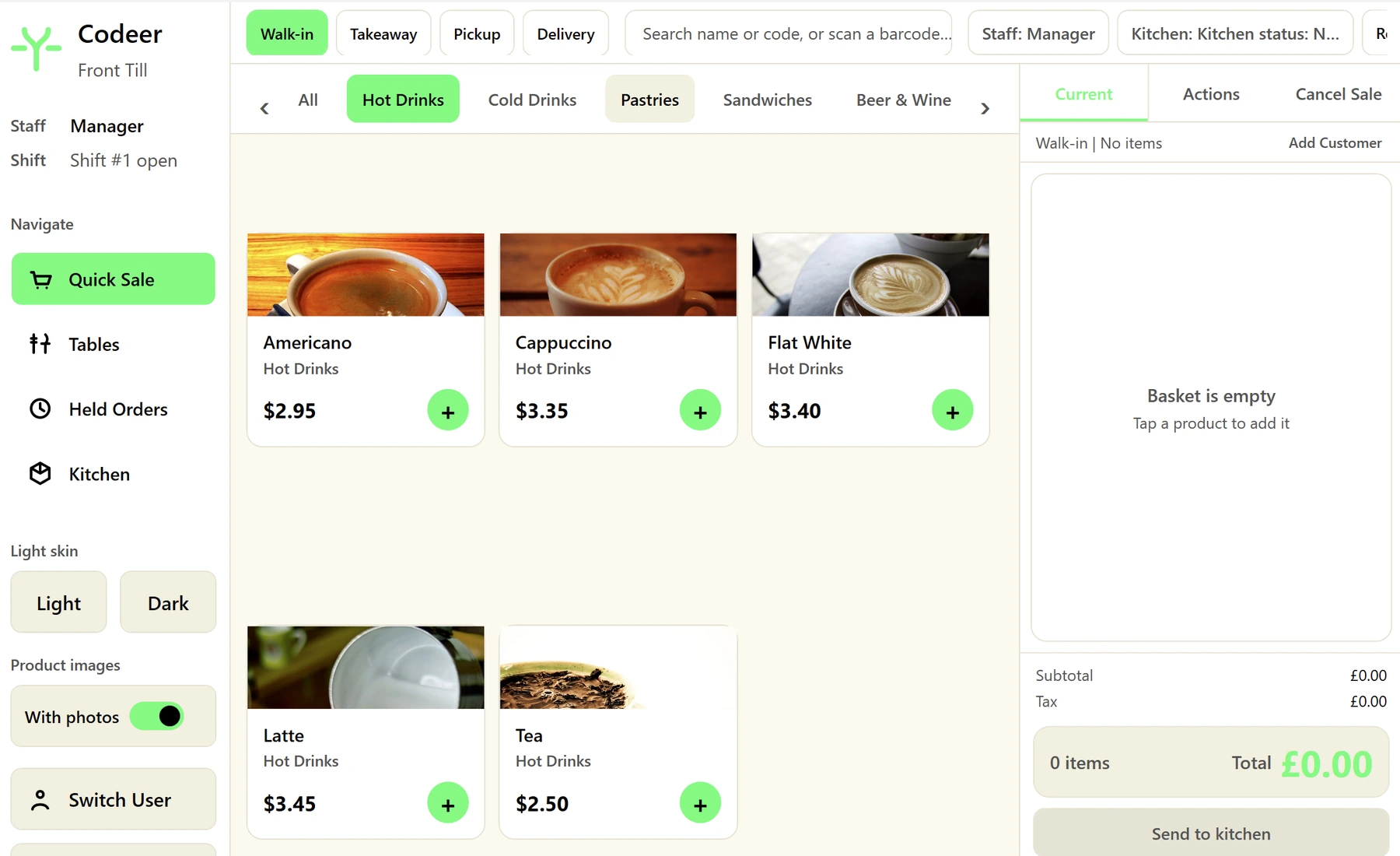
Practice example, not a recorded test: add a £3.20 latte with a £0.50 oat-milk option and a £0.60 extra shot (£4.30), a second standard latte at £3.20 and a £2.80 croissant. The expected total is £10.30. Check that the oat milk and extra shot belong only to the first latte.
Remove the extra shot before payment. The expected total becomes £9.70. Ask the barista to read back both drinks from the preparation view or ticket you intend to use. A correct basket alone does not show that the preparation station received the change. Test your printer or separate screen on the actual network.
2. Try the orders your queue really contains
- Coffee shop: regular and large sizes, a paid milk option, an extra shot and a change after sending.
- Bakery or sandwich café: one drink plus food, a sold-out item and a correction before payment. Ask whether ingredient-level stock or meal-deal rules are supported if you need them; a product list is not evidence of either.
- Eat-in and takeaway: check the order type, receipt and agreed tax configuration. Do not assume that every takeaway product receives the same VAT treatment. Use HMRC’s catering and takeaway guidance with your accountant.
3. Check payment, the drawer and the handover
For the corrected £9.70 example, test the payment method your café uses. If it is all cash, a £50 opening float with no other movements should finish at £59.70. If it is all card, the drawer stays at £50 and the card record should show £9.70 once. Compare the till and payment-provider records separately; do not infer card-terminal integration from the till’s payment screen.
Also test a refund, staff access, a restart and recovery from a backup. Online registration and activation need a connection; check ongoing internet requirements for your installed version and payment equipment. Use the café buying guide to compare results and costs.
What does setting up a café till cost?
Ordeer POS, formerly Codeer POS, is a brand of Codeer Labs Ltd. Standalone retail and hospitality EPOS is free. PRO is available for £10/month + VAT and includes cloud, ecommerce and support. Hardware, payment processing and bespoke services are separate. See Ordeer for current requirements and pricing. View Ordeer pricing.
Send Codeer your menu, existing Windows device, printer model and the way orders reach the barista. That gives us a useful starting point for setup advice or a scoped quote.
Read next: EPOS hardware checklist · What free EPOS includes.
Independent shops · Make the demonstration match your counter
Test retail EPOS from barcode to return
A small shop needs more than a fast sale screen. The product scanned, the price charged, the stock movement and any later return should tell the same story. Ask Codeer for a demonstration with your own sample product list before agreeing hardware or implementation.
Ordeer POS, formerly Codeer POS, is a brand of Codeer Labs Ltd. Standalone retail and hospitality EPOS is free. PRO is available for £10/month + VAT and includes cloud, ecommerce and support. Hardware, payment processing and bespoke services are separate. See Ordeer for current requirements and pricing. View Ordeer pricing.
1. Scan a £10.50 basket, then change it
Bring two sample items: product A at £2.50 and product B at £5.50. Scan A twice and B once: the expected basket is £10.50. Remove one A before payment: the balance should become £8.00. Check the item names, quantities, tax codes agreed for the products and final receipt. Repeat with an unreadable barcode and find the item by name or code.
Include a product code with a leading zero in your import sample. It should remain a product identifier, not become a different number in a spreadsheet. Ask how duplicate barcodes, missing prices and discontinued products are reported before importing the full catalogue.
2. Follow a sale and a return through stock
In a simple test with ten units of A and ten of B, completing the corrected basket sells one of each. If stock tracking is part of the agreed setup, expect nine units of each afterwards. A restockable return of A should bring A back to ten and record a £2.50 refund; a damaged return should follow the agreed non-saleable-stock process instead.
Ask to see the original sale, the return record, who authorised it and the resulting stock and payment totals. A displayed stock figure is not proof of purchasing, supplier ordering, variant management or multi-site synchronisation. Confirm those separately if your shop needs them.
Choose a demo that fits your type of shop
- Convenience or grocery shop: single items versus multipacks, rapid repeated scanning and price changes. If you sell weighed goods or restricted products, make scale compatibility and the required approval prompts explicit requirements.
- Clothing or gift shop: individual size/colour codes, exchanges, gift receipts and any gift-certificate process. Test the exact behaviour rather than assuming all variants share one stock balance.
- Specialist independent retailer: long descriptions, items without barcodes and catalogue imports. Check any serial-number, repair or special-order requirement before selecting a package.
What to send for a useful retail EPOS quote
- A small sample product file: item code, barcode, description, category, selling price and any stock quantity you need to carry across. Do not include customer records in the initial sample.
- The number of tills, shops and staff, plus the exact scanner, printer and cash-drawer models you already own.
- A list of essential workflows: returns, discounts, stock counts, gift certificates and accounting exports.
- Your target launch date, current system and who will approve the opening stock and prices.
Ask the quote to separate one-off equipment and onboarding from recurring software, support, payment processing and optional services. Clarify what is included in the import, training and post-launch support, and who owns the backup and export process.
What does “Xero-ready” reporting mean?
Ask for a sample export and have your bookkeeper check its columns, tax codes, refunds and reconciliation totals. “Xero-ready” should not be read as a promise of an automatic live Xero connection. Agree whether the proposed workflow is a file export, a manual import or a specifically supplied integration.
Request a retail EPOS demo and quote
Prepare with the hardware checklist, UK EPOS cost guide and daily reconciliation guide. For food service, see the separate café EPOS pilot.
Indian restaurants, curry houses and mixed-service venues
Taking table orders as well as collections?
An Indian restaurant with a takeaway counter needs to keep a table’s next course separate from a timed collection. Codeer’s recorded test above demonstrates a Pickup order and a kitchen correction. It does not demonstrate a complete dine-in service, delivery dispatch, online ordering integration or payment processing. Use the following brief to evaluate the extra workflows you need.
Build your menu around the kitchen’s decisions
Start with the base dish and the choices that change its price or preparation: protein, portion size, spice choice and paid extras. In a sample curry order, mild on one dish must not become mild on every dish. Keep “no garnish” distinct from an allergy-related instruction. Do not treat a free-text note as an allergen safety system; follow the Food Standards Agency’s allergen guidance and your venue’s handling process.
Bring a set meal to the trial as well as an individual curry. Ask how included rice, naan choices, supplements and substitutions are priced. A £0 option and an item forgotten from the basket are not the same thing. Check every choice on the preparation ticket before accepting the menu setup.
A table-service trial for your own restaurant
- Open a table with a drinks round, then add starters and mains. Leave and recall it using a second staff login.
- Ask to demonstrate course timing and routing if your service needs them. Do not assume a single kitchen send automatically provides separate course firing or multiple preparation stations.
- Change one main after sending and confirm the cook can identify the change without preparing a duplicate. The recorded pickup correction is a useful starting point, not proof of every table-service path.
- Run a timed collection alongside the table order. Staff should be able to identify which food belongs to which guest or order.
- Settle the table, inspect the receipt and reconcile the payment. Test any split bill, service charge, discount or refund you plan to use.
See the restaurant order-to-kitchen walkthrough and closing checks. If you trade mainly from a collection counter, use the takeaway EPOS page.
What should you send us before setup?
Send your menu and prices, one complex set-meal example, the number of tills and preparation stations, and your existing Windows device and printer models. Tell us whether you need table service, telephone orders, collection or delivery. Name any delivery marketplace or online ordering service you want connected; an order type labelled Delivery is not evidence of an integration with that service.
Ordeer POS, formerly Codeer POS, is a brand of Codeer Labs Ltd. Standalone retail and hospitality EPOS is free. PRO is available for £10/month + VAT and includes cloud, ecommerce and support. Hardware, payment processing and bespoke services are separate. See Ordeer for current requirements and pricing. View Ordeer pricing.